
Check out the most popular casinos
Check out the most popular casinos

Welcome Bonus
250% Bonus Up To £2,000
This platform is not a part of GamStop, so it allows UK players to register quickly and without restrictions. The process is simple, and once signed up, users can access all features on the site, play games, place bets, claim bonuses, and interact with live casino tables.
To create an account, users must click the red “Register” button at the top right of the screen. This opens a form requiring the following details:
After entering the required information, clicking “Sign Up” completes the registration process.
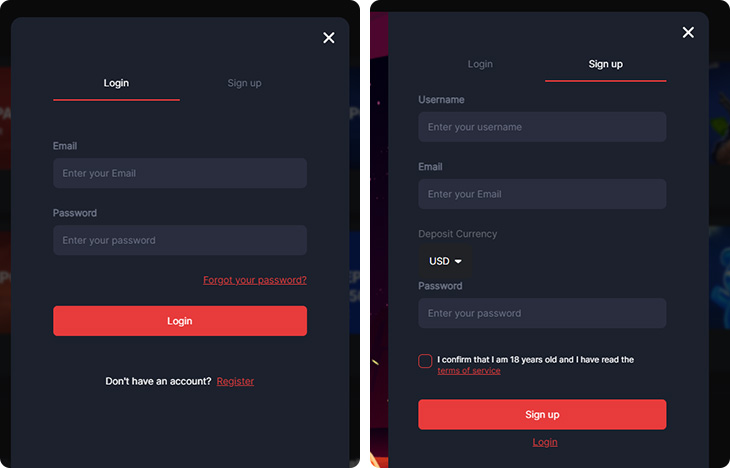
To log in, users must click the blue “Login” button next to the registration option. This will open a form where they need to enter their registered email and password.
If they forget their password, they can use the “Forgot Password” option to reset it. This feature allows users to securely regain access to their accounts by following the password recovery process via email confirmation.
The profile page contains the information users provide and allows them to see their balance, deposit and withdrawal, pending withdrawals, transaction history, and bet history. It also enables users to manage bonuses and receive notifications from the casino. The page is divided into sections based on their functions:
Each section is labeled according to its function, making it easy for users to find relevant settings or account details. For example, the ‘Wallet’ section provides an overview of available funds, while ‘Pending Withdrawals’ tracks ongoing withdrawal requests.
‘Bonuses’ displays active promotions, and ‘Notifications’ contains messages from the casino. The Personal Information section contains private details and is used for basic account management. It allows users to view and update personal details while keeping account information secure.
| Section | Details |
| Profile Overview | Displays user account details, balances, and security settings. The balance information is shown and includes total balance, real money, and bonus money. This section helps users track their funds and manage account details. |
| Account Information | Includes fields for username, email, first name, last name, phone number, country, and city. The email and username are locked and cannot be changed. However, users can update their name, phone number, and city. |
| Account Security | Allows users to change their password by entering the current one and selecting “Change Password.” Keeping a strong password is important for account security. |
| Account Verification | Displays the registered email and includes a “Verify” button. Email verification confirms the user’s identity and may be required for withdrawals or support requests. |
The platform may require account verification, but it’s not specified when. Players may need to complete verification before making a withdrawal or at any stage requested by the casino.
The profile page includes a verification section for email verification. However, verification for identity, address, and payment methods is not managed through a dedicated section and is instead requested manually when needed.
To verify an account, players must provide:
The casino does not specify how long verification takes, so players should be prepared for possible delays if requested.
How do I create an account?
Click the red “Register” button at the top right of the site. Enter a username, email, deposit currency, and password.
How do I log in?
Click the blue “Login” button, then enter your registered email and password. If needed, use the “Forgot Password” option to reset it via email.
Can I edit my personal details?
Yes, you can update your name, phone number, and city in the Personal Information section. However, username and email cannot be changed.
How do I verify my account?
There is an email verification section on the profile page. Identity, address, and payment verification are handled manually when requested by the casino.
What documents are required for verification?
Players may need to provide ID, proof of address, and proof of payment method. Accepted documents include a passport, driver’s license, utility bill, or bank statement.
When is verification required?
The casino does not specify when verification is needed. It may be requested before a withdrawal or at any time.